How to Clean a PetPivot Litter Box: AutoScooper Deep Clean Steps

Über den Autor
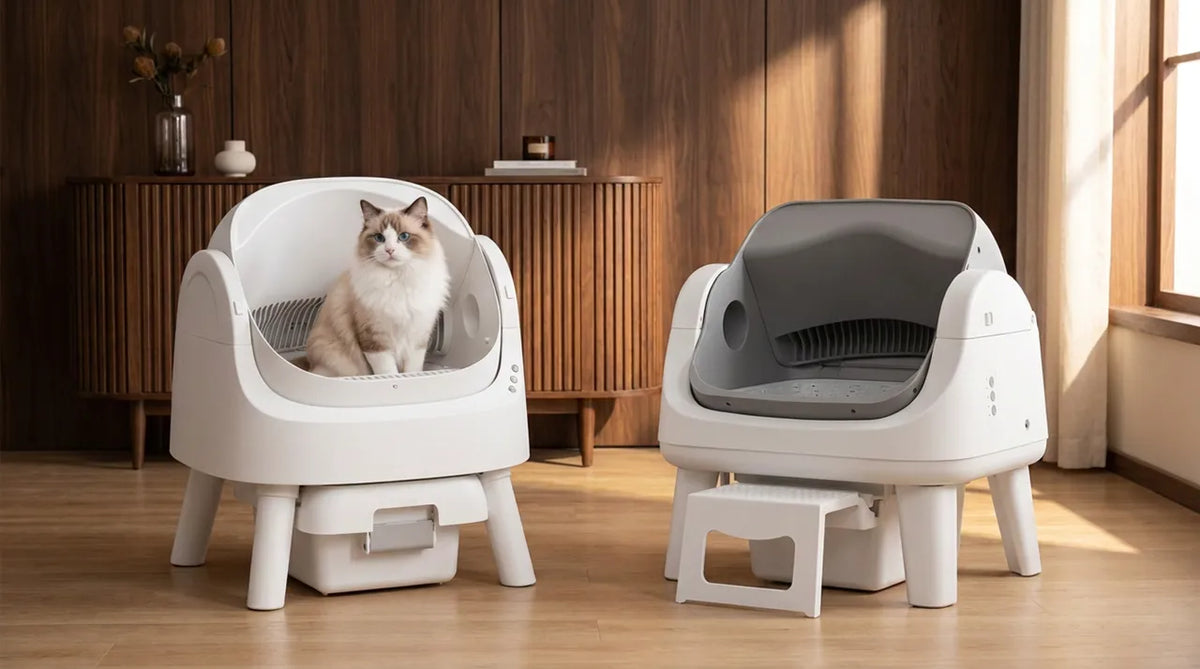
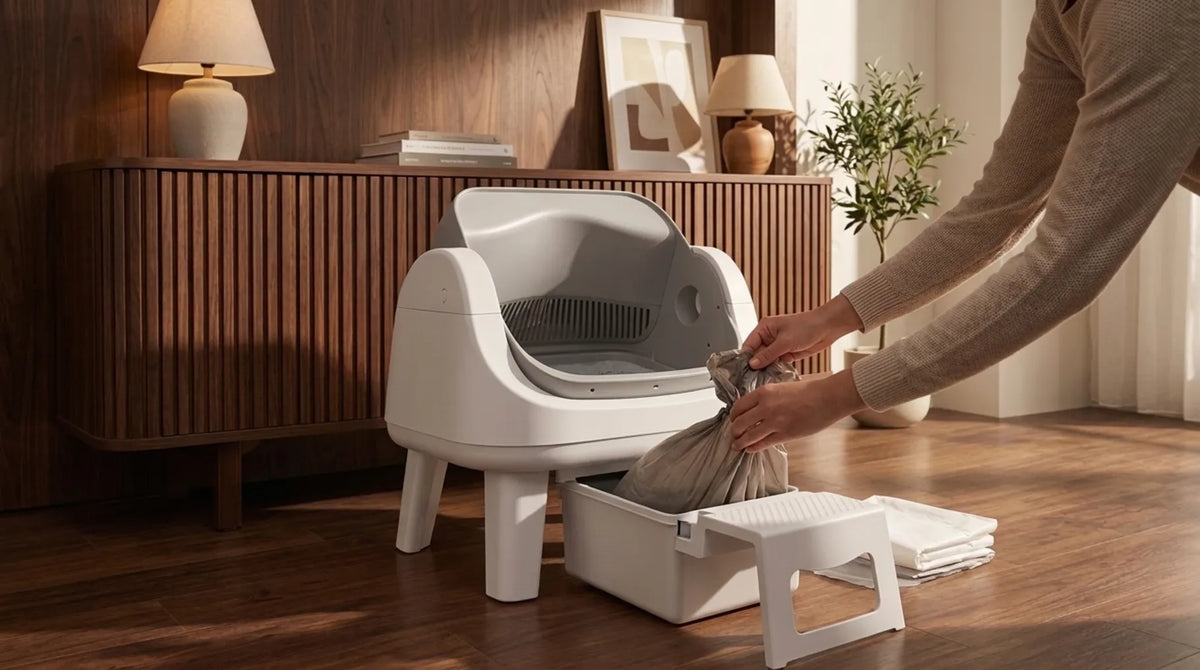
To clean a PetPivot litter box, empty the waste container every 5 to 7 days, wash the container about every 15 days, and deep clean the litter chamber once a month. Always unplug first, wash only the removable chamber, litter bed, base pad and waste container, let everything dry, then refill between MIN and MAX and press Litter Added. The AutoScooper takes care of the daily scooping, so your part is mostly the bin, the chamber and keeping the sensor areas clear. Here's how to handle each one without damaging the machine. How Often Should You Clean the AutoScooper? Each of the box components operates on its own schedule, so it is good to have an overview. The intervals are taken from the AutoScooper user manual and product page, along with the weekly cleaning from the cleaning and maintenance checklist. Task How often Check the waste container and litter level Every few days Empty the waste container and replace the liner Every 5 days, no later than 7 Wash the waste container About every 15 days Empty all litter and wash the chamber and litter bed Once a month Wipe the entrance, step and outside Weekly 1. Fast Inspections During Cleaning Intervals Simply do a fast inspection of the waste bin and the amount of litter on a daily basis. It doesn't take too long and allows you not to have to wait until the bin is full before you see. 2. Emptying the Waste Container PetPivot recommends one should empty the box once every 5 days at maximum delay of 7 days. Cleaning process transfers the waste material to the sealed box, but it is kept inside the same sealed box until the liner is removed. 3. The Monthly Deep Clean Once a month, empty all the litter and wash the chamber and litter bed. The full steps are below. 4. When to Clean More Often With several cats, heavy use, more odor or more dust, check the bin sooner than the usual interval. Our guide to the automatic litter box for multiple cats covers how capacity changes with more cats. What You Need Before You Start Gather everything before you unplug, so the box isn't out of action longer than it needs to be. You'll want fresh fitted AutoScooper 12 liners or waste bags, a soft brush, a soft cloth, a dry towel, clean water and enough small granule clumping litter to refill. A spare litter bed pad is handy too, since you can put it in while the washed one dries. Liners, waste bags and pads are all in the AutoScooper accessories collection. Leave out bleach, harsh chemicals, strongly scented cleaners, gasoline and abrasive tools or scrapers. PetPivot's guidance warns against all of them. How to Empty and Reline the Waste Container This is the job you'll do most often, and the liner step matters more than it looks. Step 1: Slide Out the Waste Container Pull the container out along its track and keep it level so nothing spills. Step 2: Tie Off and Remove the Full Liner Tie the liner closed and put it in the household trash. Step 3: Fit a New Liner Under the Retainer Ring Open the retainer ring, fit the new liner over the container, tuck the edges under the ring and close it. Step 4: Press the Liner Down to Clear the Infrared Sensor Press the liner down into the container by hand. The user guide asks for this so the liner doesn't sit in front of the infrared sensor, and a liner pulled tight across the opening may make the box think the bin is full. Step 5: Slide the Container Back Until It Locks Slide the container back along the bottom track until it clicks into place. If the alert light stays on, check that the liner is sitting low enough. How to Deep Clean the AutoScooper Step by Step Do this once a month for the AutoScooper 12 Lite. Only remove the parts shown in the user guide, which are the litter chamber, litter bed and waste container. Step 1: Disconnect the Unit Disconnect the box from electrical connection and ensure that your hands are dry when handling the plug. Step 2: Unlock the Cover Latch and Extract the Litter Chamber Unlock the cover latch and take out the litter chamber with care without causing spillage of loose litter. Step 3: Empty Out the Used Litter Place the used litter into a bag, seal it, and discard in the trash. Do not flush since septic system maintenance guidelines state that cat litter should not be flushed. CDC recommendations are that a person who is pregnant or immunocompromised should let someone do this for her or use gloves. Step 4: Extract the Litter Bed and Base Pad Remove and extract the litter bed then pull the base pad by the edges. Step 5: Clean the Chamber and the Litter Bed Clean the litter chamber and litter bed using water or scrubbing with a soft brush. Avoid anything that can cause scratches on the surface. Step 6: Clean the Litter Box Remove the bag, clean the litter box and allow it to dry completely before inserting a new bag. Step 7: Wipe the Exterior, Entrance Step and Sensor Areas Wipe the exterior, the entrance step and sensor areas using a damp cloth. However, do not use water sprays inside the machine. Step 8: Air Drying Facing Upwards Allow the machine to air dry in a dry, well ventilated area with the opening facing upwards. It is important to note that user manual explicitly prohibits drying the unit with its face down as this prevents proper drying of the inside of the machine. Step 9: Reassemble and Refill Within the MIN and MAX Markers Reassemble the unit and refill it with litter, ensuring that litter fills up to a level between MIN and MAX, ideally MAX. The capacity of the machine is 5.5L (1.5gal). Step 10: Reconnect and Press Litter Added Reconnect the machine and press Litter Added button using dry hands. This action ensures that the litter is leveled and the weight sensors are reset; therefore, it should be done each time litter is refilled. Which AutoScooper Parts Can Get Wet? The product page mentions an easy water wash design, but that applies to the removable parts only, not the whole unit. Part Water safe? How to clean Litter chamber Yes Rinse or soft brush, air dry opening up Litter bed Yes Rinse or soft brush, dry fully Base pad Yes Wipe with a damp cloth or rinse gently Waste container Yes Wash about every 15 days, dry before relining Outer shell and entry Damp cloth only Wipe, never spray Base, power port, adapter, electronics No Keep dry, never rinse or submerge Support legs No washing Wipe dry if needed How to Keep the Sensors Clean The AutoScooper uses six pairs of infrared sensors at the entrance and four Hall sensors on the drum to track your cat and the cleaning cycle. PetPivot's guidance is simply to keep the sensor areas free of litter dust and residue. Without connecting the unit to power, clean the reachable surfaces with a soft cloth that is slightly dampened. Don't open any covers or spray cleaner into the mechanism, and contact support if a warning keeps coming back. How to Stop the AutoScooper From Smelling Between Deep Cleans The machine moves waste into the sealed bin, but a few habits decide how fresh the box stays between monthly cleans. Our guide to keeping the litter box from smelling covers the room side of odor control. 1. Use the Litter It's Designed For Use small granule clumping mineral or bentonite litter. PetPivot lists crystal litter, non clumping litter and long strip tofu litter as not suitable. Our guide to which litters work in an automatic box explains why. 2. Keep the Litter Between MIN and MAX Having either insufficient or too much litter will impact the separation process; thus, you should monitor the amount of litter in between deep cleaning sessions. 3. Don't Let the Waste Container Overfill Empty the container sooner if it smells or fills quickly, especially with more than one cat. 4. Use a Base Pad and Swap It While One Dries The AutoScooper 12 Litter Bed 2 pack lets you put a clean, dry pad in while the other one dries, so the box doesn't sit out of use. 5. Skip Strong Scents Skip Scented Cleaners Cats may be put off by the odor of the cleaner if it is too pungent. The professional recommendation from veterinarians to train a cat to use a litter box includes using unscented litter because most cats like it. Common AutoScooper Cleaning Mistakes to Avoid Most cleaning problems come from a handful of easy slips. Mistake Why it matters Fix Spraying water into the unit Water can reach electrical parts Damp cloth on the outside only Drying the chamber face down The inside won't dry properly Dry with the opening facing up Liner covering the sensor May trigger a false full alert Press the liner down under the ring Forgetting Litter Added Weight sensors aren't reset Press it after every refill Bleach or scented cleaners Can damage surfaces and put cats off Water, soft brush, pet safe wipes Lifting by the joint covers Can damage the unit Lift from the bottom edge of the base Taking apart more than the chamber and bin Unauthorized disassembly isn't covered for repair Only remove what the guide shows What to Do If Something Seems Off After Cleaning Start with the parts you just took out and put back, since that's usually where the problem is. 1. The Red Alert Light Is On The user guide says a flashing or steady red light means the bin is full or a safety sensor was triggered. Check that the container is empty, the liner is pressed down and the container is locked in, then look over the unit. 2. The Cycle Won't Start Make sure you check for any indication of the “Manual Mode” being activated as this will stop the automated cleaning process. It is also important to keep in mind that your cycle won’t start if there is a cat inside. 3. Litter Is Sticking to the Chamber or Bed Check that you're using the right litter at the right level and that the base pad is fitted properly. For anything the full AutoScooper user guide doesn't cover, contact support@petpivot.com. Cleaning Tips for Kittens, Multiple Cats and Nervous Cats According to the guide, Manual mode should be used if your kitten weighs less than 3 lbs or is less than 6 months old, and also in case your cat is either pregnant or lactating. In order to activate it, you need to press and hold Clean for 5 seconds till it emits sound. If you have more than one cat, use the time when the bin gets full as an indicator instead of days. Check with your vet If your cat stops using the box after a deep clean and doesn't settle back in within a day or two, it may be more than the change. Veterinary guidance on house soiling recommends ruling out a medical problem first. FAQs How do you clean a PetPivot litter box? Disconnect it, remove the litter chamber and the litter bed, dispose of the used litter, and then wash the removable parts using water and a brush. Air dry the washed parts in an upside-down position, assemble them, fill them with litter between MIN and MAX, and press Litter Added. How often should I empty the AutoScooper waste bin? Every 5 days and no later than 7, according to PetPivot's user guide. Check sooner with more than one cat, and wash the container about every 15 days. Can you wash the AutoScooper with water? The only removable pieces: the litter tray, litter bed, base pad, and waste bin. Keep your base, power port, adapter, and electronics dry and clean the outer surface with a wet cloth. Can I use bleach or disinfectant with the AutoScooper? No. PetPivot suggests using just water and a soft-bristled brush and advises against using any bleach, strong chemicals, or perfumed cleaners. Check with customer service before using anything else. Why do I need to press Litter Added after cleaning? It levels the litter and resets the weight sensors after a refill. Press it every time you add litter, even if the surface already looks level. What litter should I use in the AutoScooper 12 Lite? Small granule clumping mineral or bentonite litter. Crystal litter, non clumping litter and long strip tofu litter aren't suitable. Can I use regular trash bags instead of AutoScooper liners? PetPivot recommends fitted AutoScooper 12 liners or waste bags. Whatever you use, it has to tuck under the retainer ring and sit below the infrared sensor. How much electricity does an AutoScooper cleaning cycle use? Very little. The unit is rated at 24 W and a full cycle takes about 10 minutes, so even running at its full rating the whole time it would use around 0.004 kWh, well under a cent at typical US electricity prices.
How Often Should You Clean the AutoScooper?
|
Task
|
How often
|
|
Check the waste container and litter level
|
Every few days
|
|
Empty the waste container and replace the liner
|
Every 5 days, no later than 7
|
|
Wash the waste container
|
About every 15 days
|
|
Empty all litter and wash the chamber and litter bed
|
Once a month
|
|
Wipe the entrance, step and outside
|
Weekly
|
1. Fast Inspections During Cleaning Intervals
2. Emptying the Waste Container
3. The Monthly Deep Clean
4. When to Clean More Often
What You Need Before You Start
How to Empty and Reline the Waste Container

Step 1: Slide Out the Waste Container
Step 2: Tie Off and Remove the Full Liner
Step 3: Fit a New Liner Under the Retainer Ring
Step 4: Press the Liner Down to Clear the Infrared Sensor
Step 5: Slide the Container Back Until It Locks
How to Deep Clean the AutoScooper Step by Step

Step 1: Disconnect the Unit
Step 2: Unlock the Cover Latch and Extract the Litter Chamber
Step 3: Empty Out the Used Litter
Step 4: Extract the Litter Bed and Base Pad
Step 5: Clean the Chamber and the Litter Bed
Step 6: Clean the Litter Box
Step 7: Wipe the Exterior, Entrance Step and Sensor Areas
Step 8: Air Drying Facing Upwards

Step 9: Reassemble and Refill Within the MIN and MAX Markers
Step 10: Reconnect and Press Litter Added

Which AutoScooper Parts Can Get Wet?
|
Part
|
Water safe?
|
How to clean
|
|
Litter chamber
|
Yes
|
Rinse or soft brush, air dry opening up
|
|
Litter bed
|
Yes
|
Rinse or soft brush, dry fully
|
|
Base pad
|
Yes
|
Wipe with a damp cloth or rinse gently
|
|
Waste container
|
Yes
|
Wash about every 15 days, dry before relining
|
|
Outer shell and entry
|
Damp cloth only
|
Wipe, never spray
|
|
Base, power port, adapter, electronics
|
No
|
Keep dry, never rinse or submerge
|
|
Support legs
|
No washing
|
Wipe dry if needed
|
How to Keep the Sensors Clean
How to Stop the AutoScooper From Smelling Between Deep Cleans
1. Use the Litter It's Designed For
2. Keep the Litter Between MIN and MAX
3. Don't Let the Waste Container Overfill
4. Use a Base Pad and Swap It While One Dries
5. Skip Strong Scents
Common AutoScooper Cleaning Mistakes to Avoid
|
Mistake
|
Why it matters
|
Fix
|
|
Spraying water into the unit
|
Water can reach electrical parts
|
Damp cloth on the outside only
|
|
Drying the chamber face down
|
The inside won't dry properly
|
Dry with the opening facing up
|
|
Liner covering the sensor
|
May trigger a false full alert
|
Press the liner down under the ring
|
|
Forgetting Litter Added
|
Weight sensors aren't reset
|
Press it after every refill
|
|
Bleach or scented cleaners
|
Can damage surfaces and put cats off
|
Water, soft brush, pet safe wipes
|
|
Lifting by the joint covers
|
Can damage the unit
|
Lift from the bottom edge of the base
|
|
Taking apart more than the chamber and bin
|
Unauthorized disassembly isn't covered for repair
|
Only remove what the guide shows
|
What to Do If Something Seems Off After Cleaning
1. The Red Alert Light Is On
2. The Cycle Won't Start
3. Litter Is Sticking to the Chamber or Bed
Cleaning Tips for Kittens, Multiple Cats and Nervous Cats
|
Check with your vet
If your cat stops using the box after a deep clean and doesn't settle back in within a day or two, it may be more than the change. Veterinary guidance on house soiling recommends ruling out a medical problem first.
|
FAQs
How do you clean a PetPivot litter box?
How often should I empty the AutoScooper waste bin?
Can you wash the AutoScooper with water?
Can I use bleach or disinfectant with the AutoScooper?
Why do I need to press Litter Added after cleaning?
What litter should I use in the AutoScooper 12 Lite?
Can I use regular trash bags instead of AutoScooper liners?
How much electricity does an AutoScooper cleaning cycle use?



You may also like

AutoScooper 11 Katzentoilette-Pink

AutoScooper 11 Katzentoilette-Weiß

AutoScooper 11 Katzentoilette


AutoScooper 11 Katzentoiletten-Einsatz – 2er-Pack

AutoScooper 11 Kotbeutel – 60 Stück
Further reading
PetPivot Litter Box Bags: Sizes, Fit and Replacement Schedule
How to Clean a PetPivot Litter Box: AutoScooper Deep Clean Steps
Best Litter for PetPivot AutoScooper: What Works and What to Avoid